
Best Digital Tools Engineering Students Need for College & Projects

Engineering students today face far more than classroom lectures. Coding assignments, design projects, lab work, teamwork, documentation, and tight deadlines often overlap in the same semester. As a result, digital tools for engineering students have become essential not optional.
With the shift from textbook-centric learning to project-based and technology-driven education, the right tools help students manage academic pressure, improve learning efficiency, and deliver higher-quality projects.
Navigating the vast array of available software can be overwhelming. To help you visualize the ecosystem, here is a snapshot of the six essential tool categories every engineering student should master.
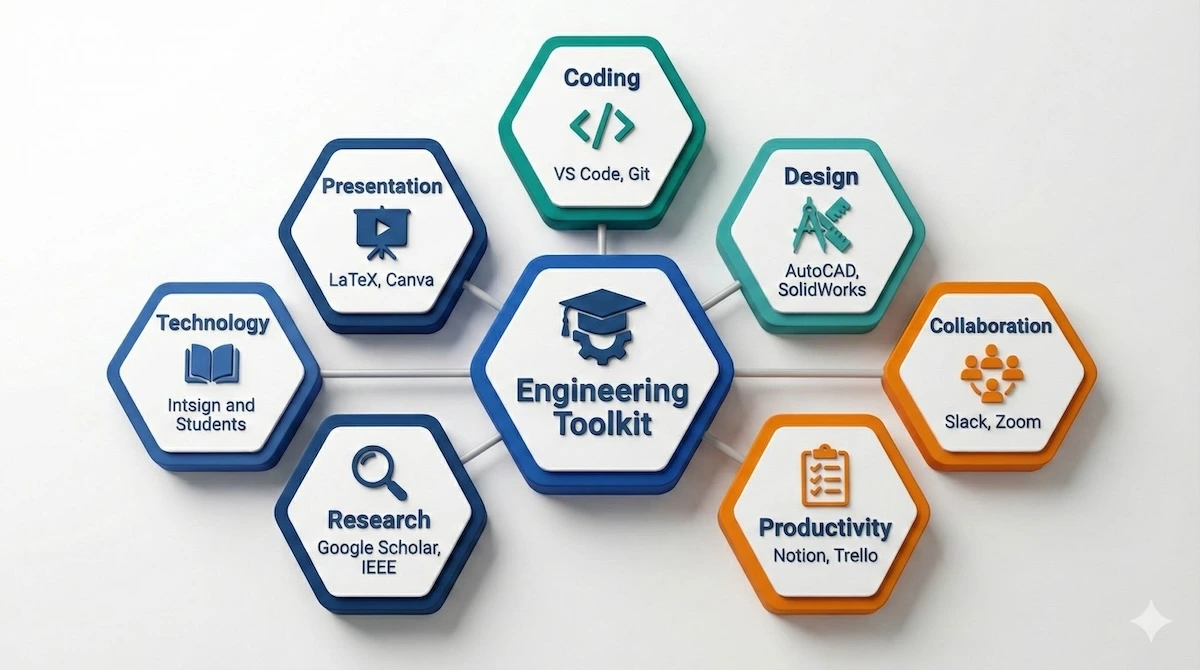
Master these six categories of digital tools to streamline your engineering projects and college coursework.
As you can see, a complete toolkit balances technical coding and design software with essential productivity and collaboration platforms.
Below is a curated guide to the most practical and widely used digital tools that support engineering students throughout college and project work.

Coding & Development Tools
Before diving into complex engineering projects, students benefit from understanding basic system workflows and shortcuts. From how to screenshot on Mac to managing system performance, small efficiencies can significantly improve productivity.
Coding tools form the foundation of most engineering disciplines today. These tools help students write, test, debug, and collaborate on code efficiently.
Visual Studio Code
A lightweight yet powerful code editor supporting multiple languages such as Python, C++, Java, and JavaScript. Its extension ecosystem allows students to add debuggers, linters, and language support tailored to specific engineering projects.
PyCharm / IntelliJ IDEA
These Integrated Development Environments (IDEs) are designed for structured programming. PyCharm is well suited for Python-based applications, while IntelliJ IDEA excels in Java development. Both tools offer intelligent code completion and error detection that help students write cleaner code.
Struggling to decide between a lightweight editor and a full-featured environment? The comparison table below highlights the key differences to help you choose the right tool for your current task.
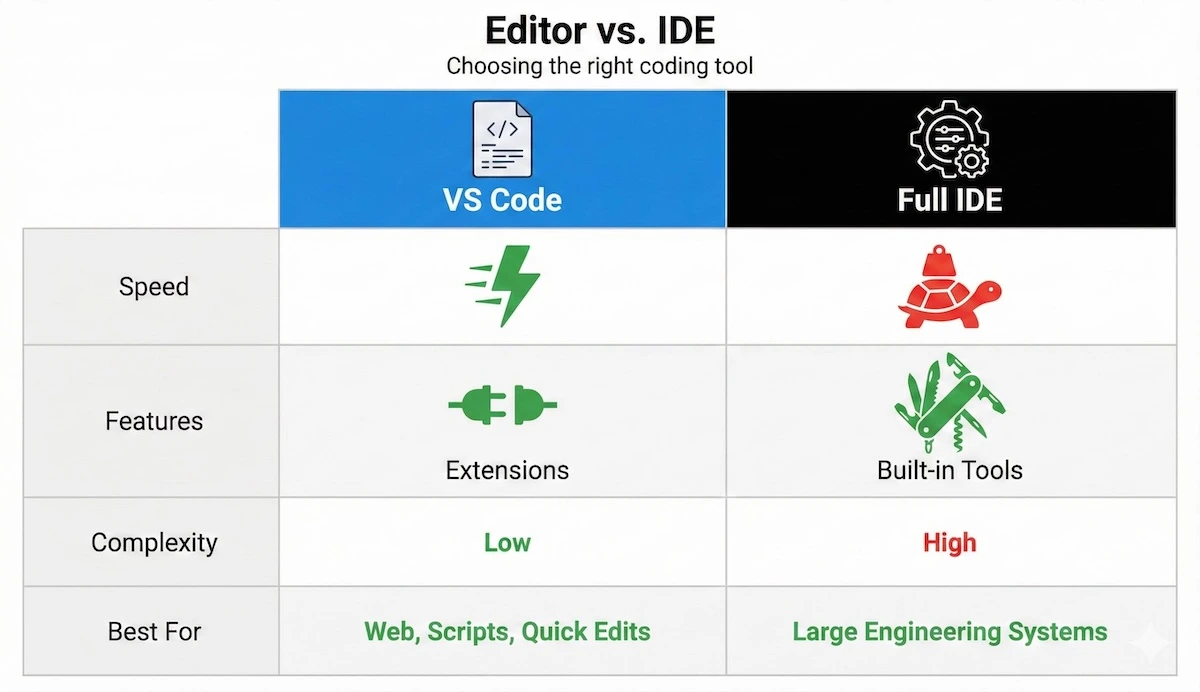
Choose VS Code for speed and flexibility, or a full IDE like PyCharm for complex, structured engineering development.
For most quick scripts, VS Code is sufficient, but don’t hesitate to switch to a full IDE when your project complexity grows.
Git & GitHub
Version control is essential for both individual and team projects. Git helps track changes over time, while GitHub enables collaboration, project sharing, and portfolio building—making it especially valuable for group assignments and capstone projects.
Design & Simulation Software
Engineering concepts often need to be visualized and tested before they can be validated. Design and simulation tools allow students to model real-world behavior and verify their ideas.
With so many powerful design options available, selecting the right one depends entirely on your output requirements. Use this decision tree to pinpoint exactly which software matches your project needs.
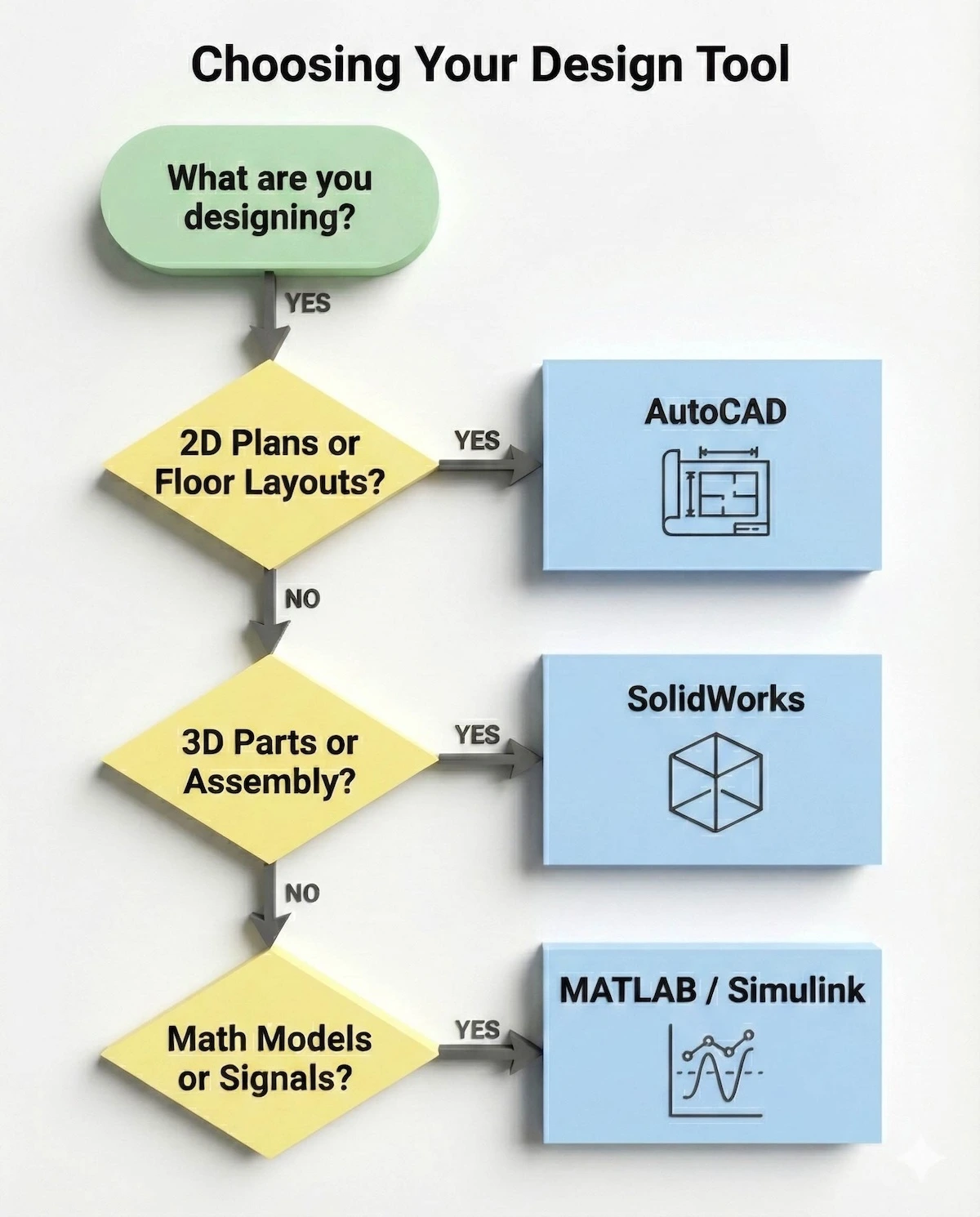
Follow this simple decision tree to pick the right software for your specific design or simulation task.
By following this logic, you avoid the frustration of starting a 3D assembly in software meant only for 2D drafting.
AutoCAD
A core drafting tool used across civil, mechanical, architectural, and related branches. AutoCAD enables students to create accurate 2D drawings and 3D layouts for design-focused projects.
MATLAB & Simulink
MATLAB is widely used for numerical computation, data analysis, and algorithm development. Simulink extends its functionality by allowing students to model and simulate dynamic systems using block diagrams—particularly useful in electrical and mechanical engineering.
SolidWorks
A 3D CAD tool commonly used for designing, assembling, and testing mechanical components. It is especially valuable for prototype development and design-oriented coursework.

Collaboration & Communication Tools
Engineering programs involve extensive teamwork. Effective coordination requires tools that support communication, file sharing, and transparency.
Google Workspace
A complete collaboration suite including Docs, Sheets, Slides, and Drive. It allows real-time editing and feedback, making it ideal for group reports and presentations.
Microsoft Teams / Slack
These platforms streamline communication by enabling:
-
Organized team discussions
-
Project coordination
-
File sharing with comments
-
Integration with tools like GitHub, Drive, and Trello
-
Improved accountability within teams
Zoom
A widely used video conferencing platform for virtual meetings, remote project reviews, and online discussions—especially helpful during collaborative project phases.
These tools don’t work in isolation; they function best when integrated into a continuous workflow. Here is how a successful engineering team cycles through these platforms during a project.
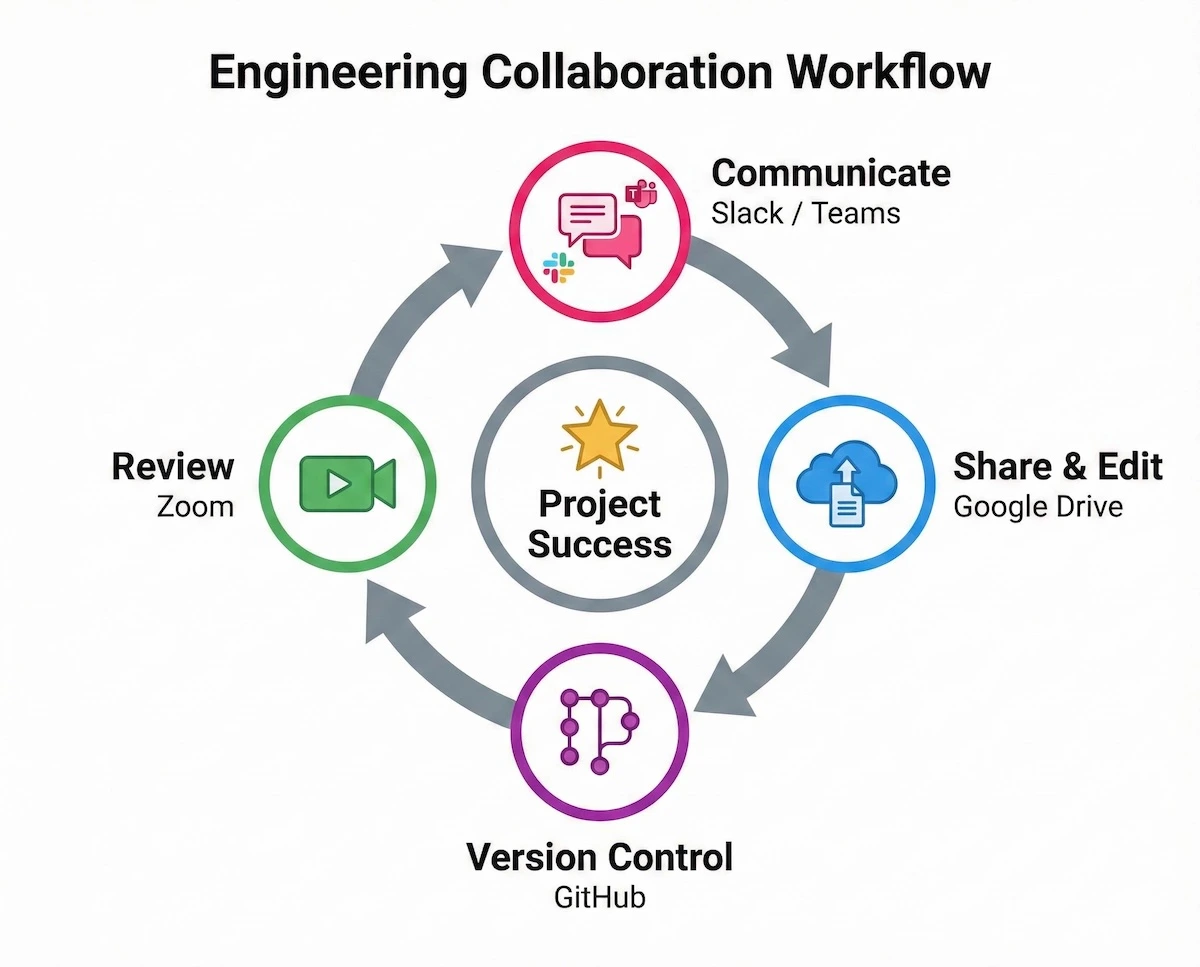
Effective teams cycle through communication, sharing, version control, and review using these integrated tools.
Mastering this ‘Communicating-Sharing-Reviewing’ loop is just as important as knowing the technical engineering concepts behind your project.
Productivity & Organization Tools
Engineering students juggle deadlines, coursework, meetings, and revisions. This makes productivity tools for engineering students essential for staying organized and focused.
Notion / Evernote
More than note-taking apps, these tools support task management and organizing daily study work. Notion, in particular, allows students to create structured dashboards for projects, schedules, and personal study systems.
Trello / Asana
These tools help break projects into smaller tasks, assign responsibilities, and track progress visually. They are especially effective for managing long-term group projects and capstone work.
Research & Learning Resources
Reliable academic resources are critical for research-based assignments and conceptual clarity.
Coursera / edX
Online learning platforms offering courses from top universities and educators. Students can strengthen fundamentals or explore advanced topics related to their engineering discipline.
IEEE Xplore / Google Scholar
Trusted sources for academic papers, journals, conference proceedings, and research articles—essential for technical documentation and final-year projects.
Stack Overflow
A community-driven platform where students can find coding solutions, learn best practices, and understand real-world implementation challenges.
Presentation & Documentation Tools
Communicating ideas clearly is just as important as building them. Well-presented projects often make a stronger impression on evaluators.
PowerPoint / Google Slides
Simple yet effective tools for presenting project concepts, workflows, and results.
LaTeX
A professional typesetting system widely used for writing technical reports, research papers, and theses with complex equations and structured formatting.
Is the learning curve of LaTeX really worth it? The visual difference between a standard word processor and a LaTeX-typeset report is immediately obvious to professors and recruiters.
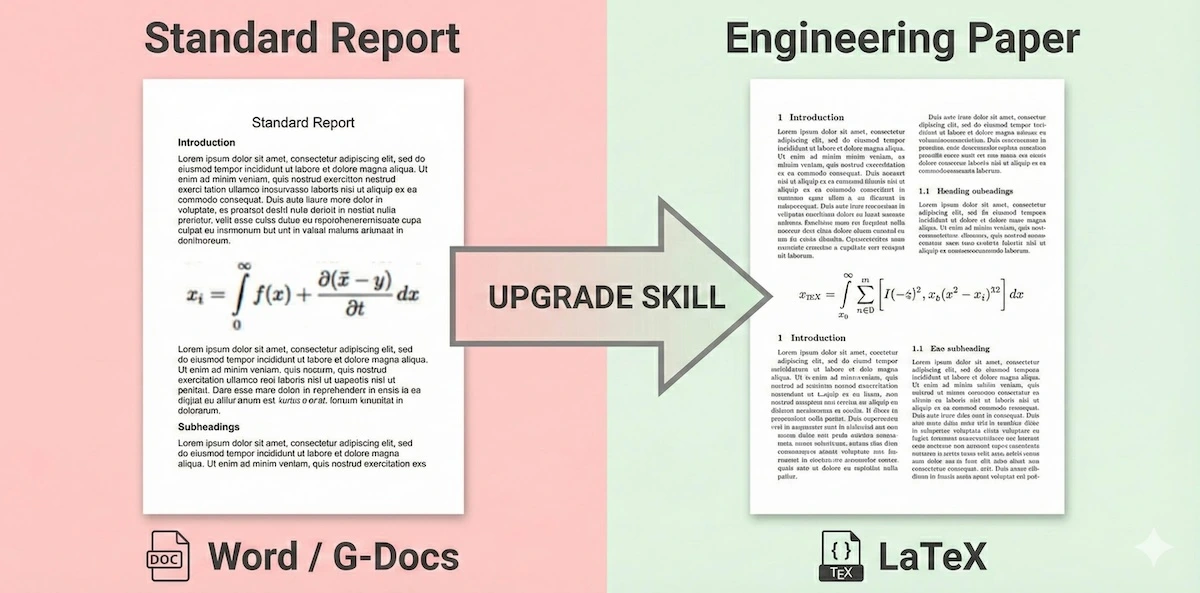
For professional, research-grade engineering reports, upgrading from standard processors to LaTeX makes a visible difference.
While standard documents are fine for rough drafts, the structured, professional finish of LaTeX or Canva is essential for your final portfolio pieces.
Canva
Useful for creating quick visuals, diagrams, posters, and banners—especially when projects require visual explanation alongside technical content.
Final Thoughts
Success in an engineering course is not driven by effort alone. It requires practical systems, smart tools, and consistent workflows. By using the right digital tools for coding, design, collaboration, productivity, and research, engineering students can reduce stress, improve efficiency, and deliver better project outcomes.
Experiment with these tools, adopt what fits your workflow, and you’ll quickly notice improvements in both productivity and academic performance.
FAQs: Digital Tools for Engineering Students
1. Are digital tools necessary for engineering students in college?
Yes. Digital tools help engineering students manage coding, design, documentation, collaboration, and deadlines more efficiently. They support both academic learning and project execution.
2. Which digital tools are most important in the first year of engineering?
First-year students benefit most from coding tools like Visual Studio Code, productivity tools such as Notion or Evernote, collaboration platforms like Google Workspace, and learning resources such as Coursera or edX.
3. Are these engineering tools free for students?
Many tools offer free versions or student licenses. Platforms like GitHub, Google Workspace, Coursera, and several CAD or simulation tools provide discounted or educational access for students.
4. How many digital tools should an engineering student use at once?
Students should avoid using too many tools simultaneously. Selecting a few tools for coding, organization, collaboration, and research is usually enough to stay productive without becoming overwhelmed.
5. Can digital tools improve engineering project outcomes?
Yes. When used correctly, digital tools improve planning, reduce errors, enhance teamwork, and help students present their ideas more clearly, leading to better project quality and results.
******************************
This article provides general educational guidance only. It is NOT official exam policy, professional academic advice, or guaranteed results. Always verify information with your school, official exam boards (College Board, Cambridge, IB), or qualified professionals before making decisions. Read Full Policies & Disclaimer , Contact Us To Report An Error
