Paraphrasing-tool.ai Review: Features, Pricing, and Alternatives 2025

- Paraphrasing-tool.ai offers six paraphrasing modes including Academic and Anti-Plagiarism.
- The free plan allows up to 4,000 characters; premium unlocks 25,000 characters.
- Yearly pricing drops to roughly $4/month, cheaper than most comparable tools.
- Refunds are limited; test the free version thoroughly before purchasing.
- The tool is not listed on Trustpilot or G2, but has 9,300+ on-site reviews.
For students, content writers, bloggers, and researchers, finding a reliable way to rewrite existing text efficiently is often easier said than done. With hundreds of tools on the market, many promise the world but fail to deliver results that feel human. That’s where Paraphrasing-tool.ai can help. It brings together several useful writing functions into one interface. In today’s review, we are going to walk you through what users are saying, what the tool offers, how it compares to rivals, and what you can expect from its pricing in 2025.
If you’re unsure whether this platform fits your needs, keep reading; we’ve got you covered. Students who also need support understanding course material — whether in microeconomics tutoring or other subjects — may find that paraphrasing tools complement, but do not replace, genuine learning.
User Feedback and Testimonials
You can easily find reviews of tools like QuillBot and Grammarly on platforms like Trustpilot or G2. But Paraphrasing-tool.ai isn’t listed on those platforms. The absence of this AI paraphrasing tool on those review sites isn’t a red flag. Some new tools just haven’t been reviewed on those platforms yet.
However, the good news is that you’ll find user reviews on the company’s own website. They have 9,300+ reviews, and the average rating is very high: 4.9/5 stars. That’s impressive!
Many users talk positively about specific features that they truly like. For example, the Fluency mode often gets highlighted for improving how text flows. Others appreciate the “humanizer” feature, which helps rewrite robotic or AI-like phrasing into something more natural. Speed also gets high marks; people note that results show up fast.
If you’re unsure, trying the free version first is a smart way to see if the tool lives up to its claims before opening your wallet.
Subscription Plans and Costs
Price Structure
Paraphrasing-tool.ai keeps things fairly simple with three plans: weekly, monthly, and yearly. What stands out here is the big discount that new users get. The weekly plan, usually $14.95, drops to just $4.95 during the first payment. Monthly pricing falls from $29.95 to $9.95, and the yearly option sees the most savings, just $49.95 instead of $149.95.
No matter which pricing plan you choose, you’ll get access to all the same features. There’s no difference in what’s included at each level. The only thing that changes between the pricing options is the billing frequency, like monthly vs. yearly, not the actual features.
To see exactly how much you can save by committing to a longer term, take a look at the price breakdown below.

Choose the plan that fits your semester budget, with the yearly option offering the most significant savings.
As you can see, the yearly plan offers the best value, dropping the effective monthly cost significantly compared to the weekly option.
Compared to similar tools that require extra payment for additional features, Paraphrasing-tool.ai includes more features in its base price. For students managing coursework in demanding subjects — such as those seeking an online macroeconomics tutor — keeping software costs low matters.
What Premium Membership Includes
If you upgrade from the free to the paid version of the tool, you’ll get a lot more features. First off, all the paraphrasing limits disappear. Free users hit a cap, but paid members can run unlimited paraphrasing and summarizing sessions.
You will get access to its six different paraphrasing modes. These modes are: Creative, Anti-Plagiarism, Fluency, Formal, Academic, and Blog.
It can be confusing to know which mode to use for your specific assignment, so here is a visual guide to what each style achieves.
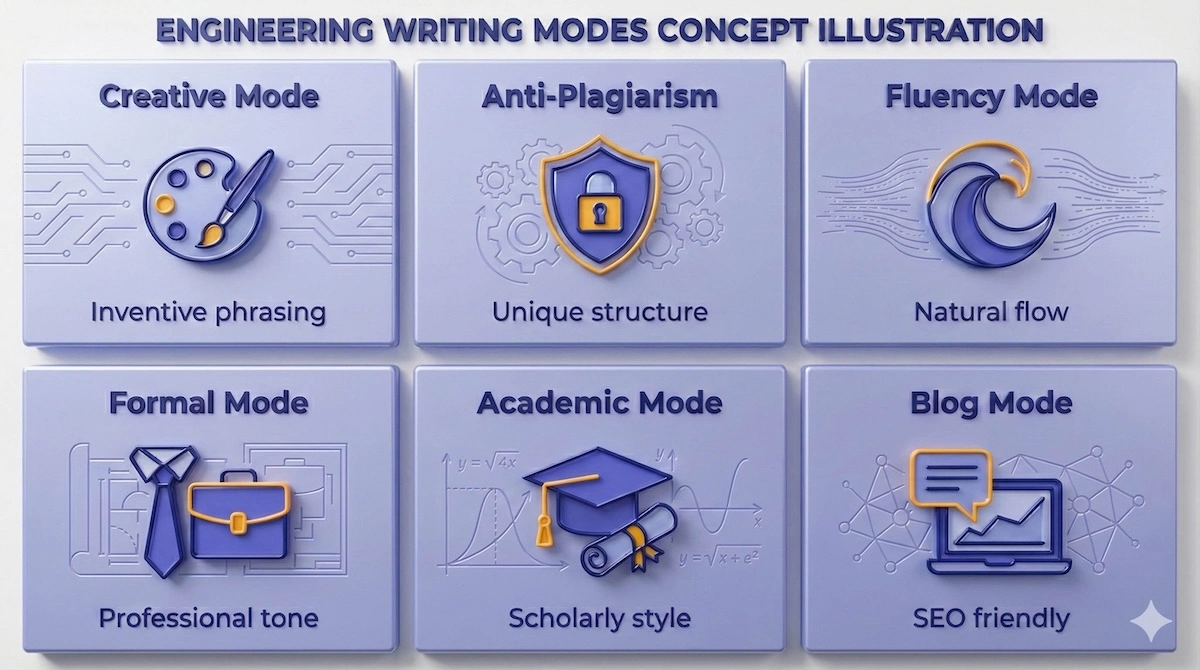
Select the specific mode that matches your assignment type, from Academic for research papers to Blog mode for web content.
By selecting the right mode, such as ‘Academic’ for research papers or ‘Creative’ for storytelling, you ensure the output matches your required tone.
Each writing mode is useful for a different purpose. You can pick the one that matches your target audience or the tone you want in your writing. Want something scholarly? Use Academic. Writing a blog post? The Blog mode has you covered. It even lets you freeze certain words so your keywords stay the same.
Other perks include sentence-level paraphrasing, faster processing, and support for longer documents (up to 25,000 characters in one go). You also get rid of those annoying ads and captcha pop-ups. There’s live chat support if you need assistance.
The cherry on top? The humanizer tool. This feature helps you bypass AI content detection, which is becoming more important in both academic and digital publishing spaces.
Student Perspectives on Pricing
For students juggling assignments and budget constraints, the discounted first-year pricing offers a real break. At just over $4 a month if billed annually, it’s cheaper than many textbooks or tutoring apps. The Academic and Anti-Plagiarism modes are clearly tailored with school needs in mind.
Long essays, thesis chapters, and research projects often exceed the word limits allowed by free tools. Here, the generous 25,000-character limit ensures students don’t have to split up documents or edit piecemeal. Students working through quantitative coursework — for instance, those who need help with econometrics homework — often find that paraphrasing tools help them articulate their understanding more clearly in written work.
Hidden Fees and Additional Costs
The platform isn’t breaking up services into separate purchases (like some do with grammar checks or plagiarism tools); you get a full-feature package at no extra cost. Paraphrasing-tool.ai offers all its tools together in one package. You don’t need to purchase different tools like the Grammar Checker, Text Summarizer, and Humanize AI Text separately. All the features are included in one plan. No need to pay extra for them.
Subscription Management and Billing
Once you purchase their premium plan, the service will automatically charge you again when the current billing period ends unless you go in and stop it yourself. Auto-renewal is a common practice in subscription-based services.
Managing the subscription is simple enough. Head to your dashboard, and you’ll find cancellation options or reach out to support via chat. The site offers flexibility for changing plans if your needs shift.
The yearly plan is best if you plan to use the tool frequently. But if you’ve got a one-time paper or content project, a weekly or monthly option may be a smarter fit.
Trial Options and Free Access
There’s no official “free trial” that unlocks premium features for a short period, but the free version itself is surprisingly useful. Users can run paraphrasing jobs up to 4,000 characters at a time, and there are three modes available: Creative, Fluency, and Anti-Plagiarism.
The difference between the free and premium character limits is substantial; see the comparison chart below to understand the capacity gap.
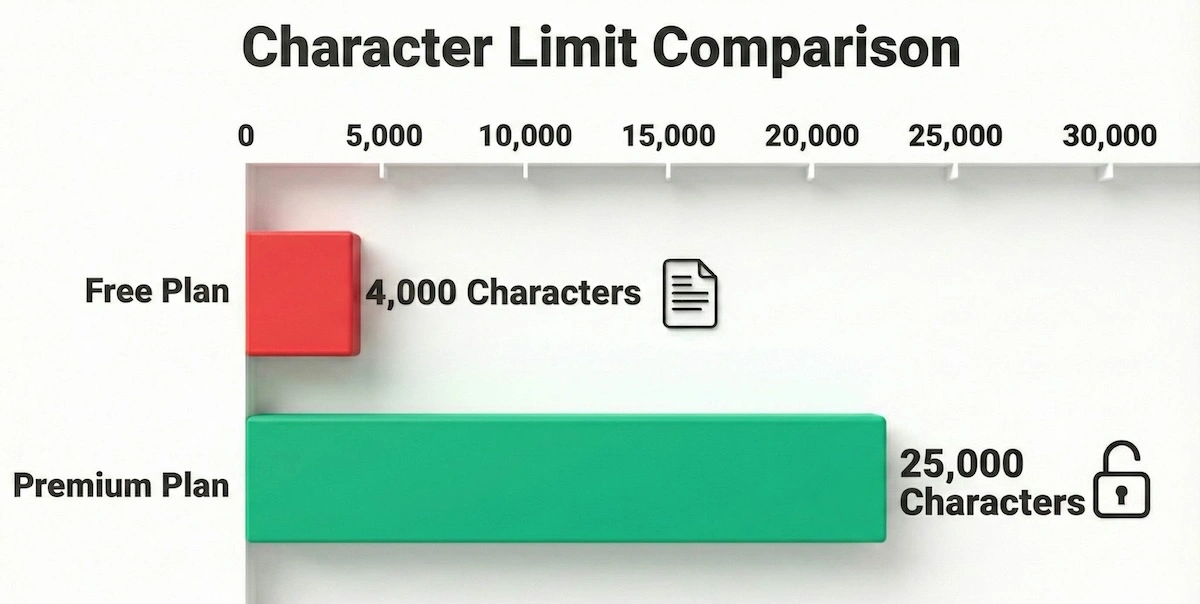
The Premium plan increases your capacity by over 600%, allowing for full thesis chapters or long articles in a single click.
With the Premium plan, you can process entire chapters or long articles in a single click, eliminating the need to copy-paste small sections repeatedly.
Unlike tools that show cool features and then lock them behind paywalls, Paraphrasing-tool.ai gives you access to a good number of its features for free, so you can actually try it out properly without immediately needing to pay. You can test the tone, accuracy, and structure before upgrading.
The free version works like a trial, but it’s better in one way: it doesn’t expire after a few days. You can use it a few times for free, though some features might still be locked unless you pay.
For a broader look at how other tutoring and learning platforms handle free access, see our Brainfuse review for comparison.
Return Policy and Refunds
Refunds are rare, and the company is upfront about that. They say the free plan is designed to give you a full preview of what you’ll get. Because of that, they consider change-of-mind refunds unnecessary.
Still, if something goes wrong technically, like if you paid but your account didn’t upgrade, you can request a refund within 48 hours. There’s also coverage for double charges if you report them within a day.
However, if you’ve already used more than 5,000 words, don’t expect a refund. Discounted subscriptions are also non-refundable. So, test the tool well with the free version before buying.
Competitive Analysis and Alternatives
Before we dive into the details, here is a quick side-by-side comparison of how Paraphrasing-tool.ai stacks up against major competitors like QuillBot and ZeroGPT.
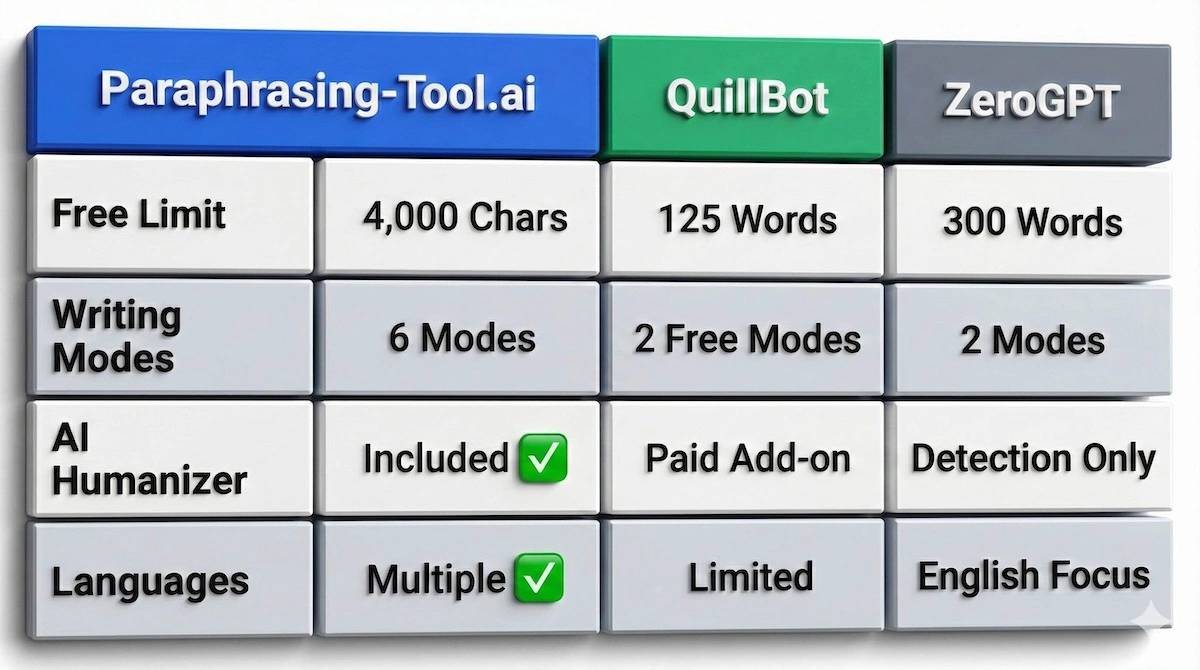
While competitors limit free users to short paragraphs, Paraphrasing-tool.ai offers significantly more capacity and features without a subscription.
While other tools may have better brand recognition, this comparison highlights that Paraphrasing-tool.ai offers significantly more features and higher limits for free users. Students in science-heavy programs — including those looking for a pathology tutor — often need to paraphrase dense source material, making character limits a practical concern.
Text Paraphraser by ZeroGPT
ZeroGPT offers a much simpler experience, which might appeal to users who just want basic rewrites. It’s limited to 300 words at a time and has only two free modes: Standard and Simple.
For quick fixes, that might be enough. But if you’re working with academic content, blog posts, or long-form writing, the character cap becomes a dealbreaker. Plus, the lack of stylistic flexibility means ZeroGPT feels basic compared to the more dynamic options found in Paraphrasing-tool.ai.
Its standout strength is its integration with AI detection tools, but that’s about where its edge ends.
QuillBot Comparison
QuillBot is the heavyweight in this space, with thousands of users and deep integrations with platforms like Google Docs. But it comes at a cost. The free version only allows 125 words at a time, barely enough for a paragraph.
If you need depth, QuillBot is excellent. Its rewrite quality is sharp, and its interface is polished. But you’ll pay more, especially if you want add-ons like plagiarism detection or grammar suggestions.
In contrast, Paraphrasing-tool.ai bundles all those extras, including a humanizer tool, for a much lower price. If brand trust and integrations matter most, go with QuillBot. But if value and flexibility top your list, Paraphrasing-tool.ai might be the better fit.
Read this article to learn more about QuillBot.
Grammarly’s Paraphrasing Tool
Best known for its grammar checker, Grammarly also offers an online paraphrasing tool. Its rewriter lacks depth, offering general tweaks instead of specialized tones. Like QuillBot, the free version limits you to 125 words.
If you already use Grammarly Premium, it’s a nice bonus. But it won’t replace a full-featured paraphraser. For serious rewriting, Paraphrasing-tool.ai still offers more targeted modes, character space, and better adaptation.
Readers comparing learning platforms more broadly may also find our Kumon review useful for context on how structured programs differ from AI writing tools.
Platform Functionality and User Experience
Getting Started with Paraphrasing-tool.ai
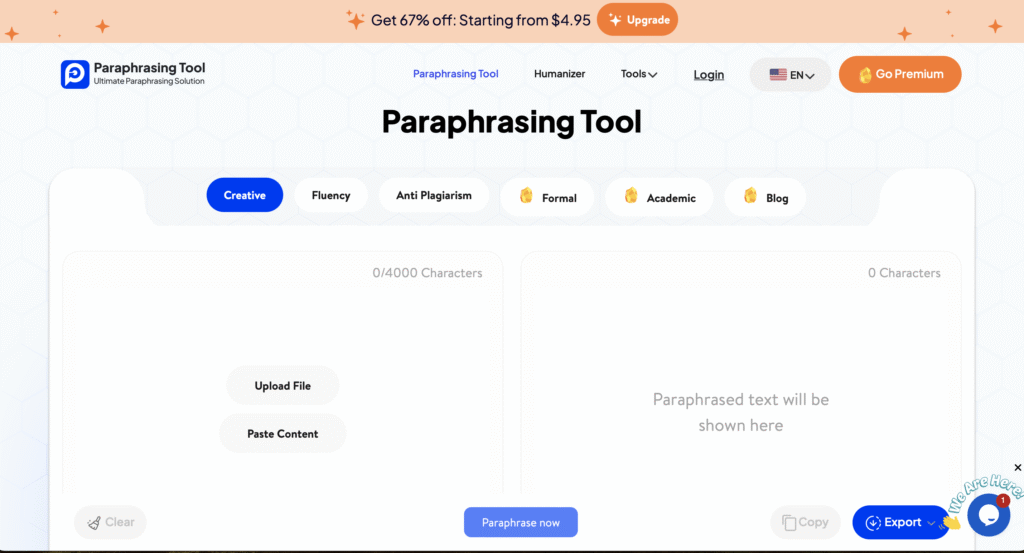
No registration is required to test the free version. You visit the site, paste your text, pick a mode, and click “Paraphrase Now”. If you want to track usage or upgrade, creating an account helps, but it’s not mandatory.
The layout is clean, with clear labels for modes, input space, and output. Premium-only options are marked, so there’s no confusion about what’s accessible. It’s straightforward even for non-tech-savvy users.
Advanced Features and Tools
Beyond basic rewrites, the platform also helps make AI-sounding text read more naturally. The AI humanizer does exactly what it says: helps pass detection tools that flag robotic writing. This feature is a big win for students or content creators using AI tools.
Other add-ons include grammar correction, summarization, and rewording. They’re not standalone-grade like Grammarly, but they handle basic edits well. The plagiarism remover helps rework flagged text, although you should still check using a detection tool for final verification.
Understanding how this ‘humanization’ actually works can help you trust the process. Here is the step-by-step workflow.
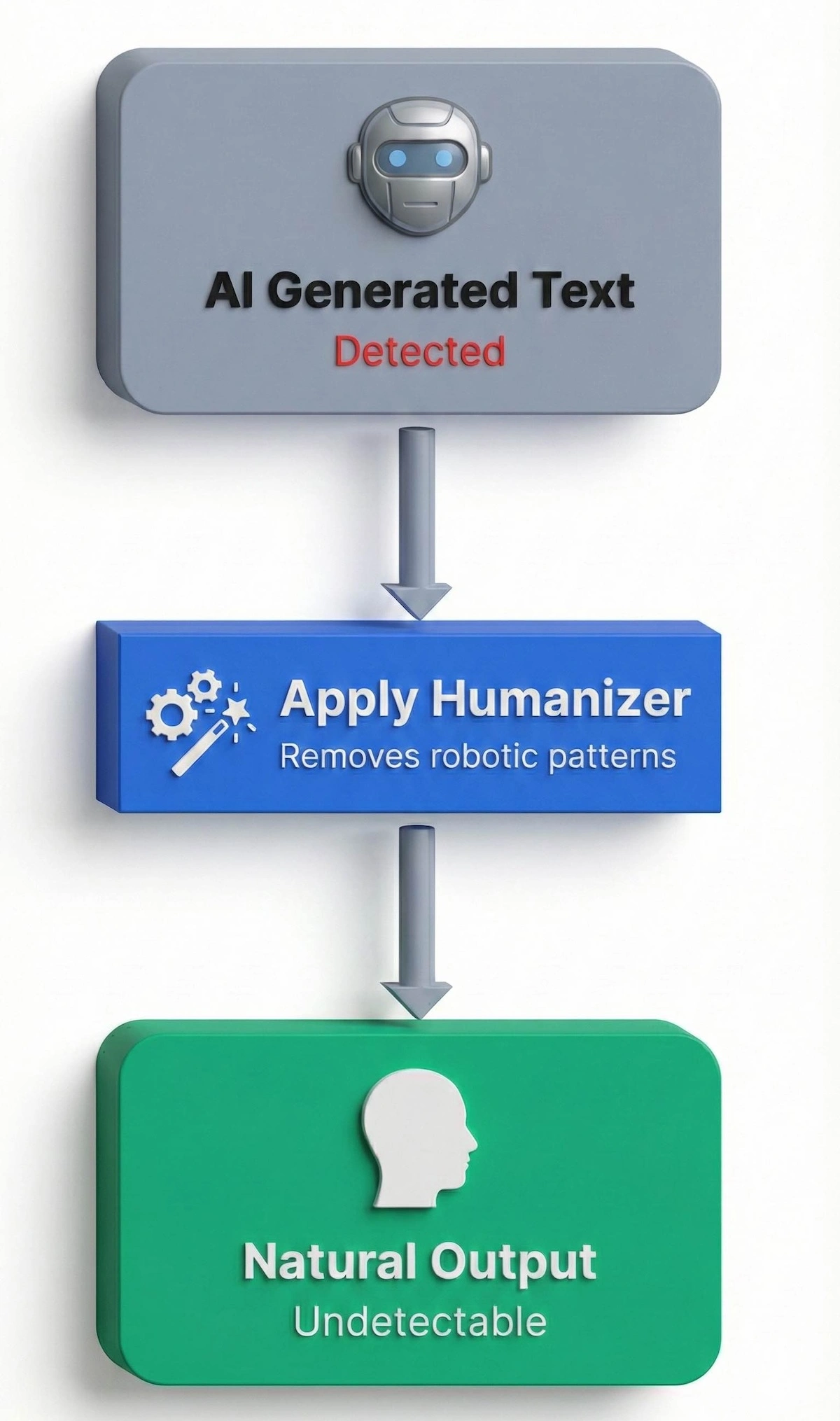
The Humanizer tool modifies sentence structure and vocabulary patterns to transform robotic AI outputs into natural-sounding writing.
This process smoothes out the predictable patterns that AI detectors look for, resulting in text that reads as if a human wrote it.
Language Support and Global Accessibility
One thing that sets Paraphrasing-tool.ai apart is its multilingual support. You’re not limited to English. That’s a huge plus for global users or non-native English writers. Since it’s web-based, there’s nothing to install. Any modern browser will do, and it works fine on both phones and desktops.
Non-native English speakers studying abroad — including those who benefit from a pathophysiology teacher online — often find multilingual paraphrasing support especially valuable.
Target Users and Applications
Academic Writers and Students
If you’re in school, this tool is tailor-made for you. The Academic and Anti-Plagiarism modes are lifesavers. Whether it’s rewriting sources or improving clarity in your thesis, the tool helps make writing sound smarter, without crossing ethical lines.
It also helps students convert dense research into understandable summaries or transform AI-assisted work into human-sounding writing.
Content Creators and Bloggers
Writers working on web content, blogs, or social posts benefit most from Blog and Creative modes. The keyword freezing feature is a gift for SEO writers. It keeps your ranking terms intact while updating stale copy.
If you’ve got a longer article or post, Paraphrasing-tool.ai‘s summarizer can automatically trim it to fit the character limits. You don’t have to start over every time you want to share on a new channel.
For those evaluating other platforms that serve language learners and content creators, our reviews of LanguaTalk and Cambly offer useful points of comparison.
Performance and Reliability
Processing Speed and Efficiency
Premium users get 10X faster results. This matters when you’re in a rush or handling bulk content. No waiting around. The 25,000-character limit means full blog posts or papers can be edited in one shot.
Customer Support and Assistance
Live chat is available 24/7 for paid users. If you need help fast, it’s there. There’s also a help section, but it’s a bit limited. Thankfully, the tool is easy to use, so support needs are usually minimal.
Future Development and Platform Evolution
AI is changing fast, and this tool seems to be evolving with it. The focus on humanization sets it up well to deal with detection issues going forward. Expect even more language support and tool integrations as it grows.
Frequently Asked Questions (FAQs)
Does Paraphrasing-tool.ai humanize AI-generated content?
Yes, the humanizer tool in Paraphrasing-tool.ai is built for that. It makes robotic-sounding writing flow better, helping it pass detection tools — though success depends on how detectable the original was.
How does plagiarism removal work in Paraphrasing-tool.ai?
Paraphrasing-tool.ai completely rewrites the text. Pair it with an online plagiarism checker tool for the best results.
Is Paraphrasing-tool.ai better than QuillBot?
For price and bundled features, yes. For trust and integrations, QuillBot leads.
Does Paraphrasing-tool.ai work on all devices?
Yes, Paraphrasing-tool.ai runs through your browser on any device.
Can I cancel my Paraphrasing-tool.ai subscription easily?
Yes. Go to your dashboard or chat support to stop renewal. Just do it before the next billing cycle.
Final Assessment
Paraphrasing-tool.ai offers a solid blend of affordability, functionality, and ease of use. The features cater to students, bloggers, and professionals looking for a one-stop text improvement solution. While it lacks third-party reviews, its generous free version gives you ample room to test.
The pricing is competitive, the features are practical, and the user experience is smooth. Just be sure to watch those renewal rates. If that’s not a dealbreaker, this tool is worth a closer look.
Related Reading
******************************
This article provides general educational guidance only. It is NOT official exam policy, professional academic advice, or guaranteed results. Always verify information with your school, official exam boards (College Board, Cambridge, IB), or qualified professionals before making decisions. Read Full Policies & Disclaimer , Contact Us To Report An Error