
AllMath Review 2026: AI Math Solver Features, Pricing, and Alternatives

Key Takeaways
- AllMath is a free AI math solver with full step-by-step solutions and no account required.
- It covers algebra, calculus, trigonometry, geometry, statistics, and basic linear algebra.
- Photo and camera input work reliably for clearly written or printed problems.
- AllMath outperforms Photomath’s free tier on step detail; Symbolab Pro leads on advanced topics.
- Advanced engineering topics like PDEs and Laplace transforms need verification with specialist tools.
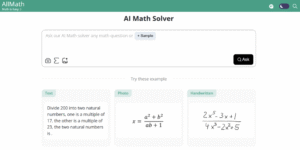 AllMath is a free AI-powered math solver that provides step-by-step solutions across algebra, calculus, trigonometry, geometry, and more. Unlike a basic calculator, it breaks down each stage of a solution with explanations, making it useful not just for getting answers but for understanding the method behind them. Students preparing for IB Math HL/SL tutoring will find its step-by-step algebra and calculus output particularly relevant to their coursework.This review tests AllMath on real engineering coursework problems, covers the free plan and any paid options, and compares it directly against Photomath and Symbolab so you can decide which tool fits your study workflow.Top AI Tools for Students to Write Smarter, Not Harder
What Is AllMath’s AI Math Solver and How Does It Work?
AllMath’s AI math solver accepts input through multiple methods: you can type equations directly using standard notation, upload a photo of a handwritten or printed problem, or use your device’s camera to scan problems in real time. Once submitted, the solver processes the problem and returns a step-by-step breakdown that mirrors the kind of structured explanation you would see in a textbook or from a classroom teacher.The platform covers a wide range of mathematical topics. For the subjects most relevant to engineering students, AllMath handles:- Algebra: solving linear, quadratic, and polynomial equations; factoring; systems of equations
- Calculus: derivatives (chain rule, product rule, quotient rule), integrals, limits
- Trigonometry: identities, solving trig equations, unit circle
- Geometry: area, perimeter, volume, coordinate geometry
- Statistics: mean, median, standard deviation, probability
- Linear Algebra: matrix operations, determinants (basic)
Testing the Effectiveness of AllMath’s AI Math Solver
 To assess AllMath’s practical usefulness, we tested it across four problem types typical of first and second-year engineering coursework.
Solving Algebraic Equations
AllMath performed well on algebraic equations including linear systems, quadratics, and factoring tasks. For a two-variable linear system, it correctly applied elimination and substitution, labelled each step, and confirmed the solution by back-substitution. The explanation was clear and followed the same sequence you would use working through the problem on paper. For a quadratic requiring the quadratic formula, it correctly identified the coefficients, substituted them, simplified the discriminant, and presented both roots.Working Through Calculus Steps
On calculus problems, AllMath demonstrated strong performance on differentiation. Testing the chain rule on a composite function and the quotient rule on a rational function both produced correct results with clearly labelled intermediate steps. The chain rule output explicitly identified the outer and inner functions before differentiating, which is the standard teaching approach and makes it easy to follow the logic.Integration results were also accurate on polynomial and basic trigonometric integrands. More complex integration techniques (integration by parts, trigonometric substitution) produced correct answers though the step labels were occasionally less explicit than for differentiation.Depth of Explanation
Compared to tools that return only an answer, AllMath’s explanations are substantively better for learning. Each step includes a label identifying which algebraic operation or calculus rule is being applied. This makes it usable for checking your own working: if your method and the tool’s method diverge at a particular step, you can identify exactly where your reasoning differs. The depth is comparable to a worked example in a textbook, with the advantage that the problem is your specific input rather than a generic illustration.Speed, Accuracy, and Input Flexibility
Response time is fast typically 3–8 seconds for most algebra and calculus problems. Image and camera input worked reliably for clearly written or printed equations; handwritten input with non-standard notation or unclear formatting produced occasional misreads. Typing problems directly in standard mathematical notation gave the most consistent results. Accuracy was high on the problem types tested; more advanced engineering topics (partial differential equations, complex number applications, Laplace transforms) were not all within scope, and results for these should be verified independently.Comparing Its Output to Other Math Solvers
When tested on the same set of problems, AllMath’s explanation quality was notably better than Photomath’s free tier (which limits step-by-step detail) and comparable to Symbolab’s core solver. The key difference from Symbolab is that AllMath’s free plan places no obvious hard limit on usage, while Symbolab’s free tier includes advertising and restricts some advanced solution steps behind a paywall.AI for STEM Learning Using Generative Tools to Make Math and Engineering Concepts EasierAllMath for Engineering Students
Engineering students encounter a specific set of mathematical challenges that generic math solvers do not always handle well. AllMath’s strongest applications for engineering coursework are outlined below. Students working through quantitative modules may also benefit from quantitative finance tutoring to build the analytical foundations that underpin applied mathematics.First-Year Calculus and Engineering Mathematics
AllMath is most directly useful for the calculus and mathematics modules that underpin first and second-year engineering: differentiation, integration, differential equations (first-order), and matrix operations. For the kind of textbook practice problems that engineering students work through at volume, AllMath provides an on-demand answer-checking and explanation service that is faster than waiting for tutors and more detailed than answer sheets.Checking Homework and Assignment Working
The most reliable use case is checking your own working against AllMath’s step-by-step output. When studying for competitive exams, this means you can work through 20–30 problems in a session, submit each to AllMath after completing it, and immediately see whether your method matched the correct approach not just whether your final answer was right.This tight feedback loop is more effective for exam preparation than reviewing only final answers. For completing homework more efficiently, AllMath can unblock you when you are stuck on a specific algebraic manipulation without giving away the entire solution prematurely.Understanding Specific Techniques
When an engineering student encounters a technique they have not used before integration by parts, implicit differentiation, or eigenvalue calculation AllMath’s step-by-step output provides an immediate worked example on a problem of their choosing.This is more targeted than reviewing a generic textbook example because the method is demonstrated on your specific input rather than a simplified illustration. For understanding the logic behind an algebraic equation transformation, seeing the exact steps applied to your problem is more useful than a general description.Limitations for Advanced Engineering Topics
AllMath is strongest on undergraduate-level pure mathematics. For more advanced engineering applications partial differential equations, Fourier transforms, numerical methods, circuit analysis using complex impedances, or fluid mechanics equations it may not cover all problem types or may produce outputs that require verification.Students in later years of engineering should treat AllMath as a first-pass check and confirm results from advanced problem sets with course materials, subject tutors, or specialist tools like Wolfram Alpha for symbolic computation.Lorex vs Hikvision vs Coram: Consumer Cameras vs Enterprise AI SurveillanceAllMath Pricing: Free Plan vs Paid Options
AllMath operates primarily as a free tool. The core AI math solver, step-by-step explanations, and multi-input modes (typed, photo, camera) are all accessible without creating an account or providing payment details. There is no enforced daily usage limit on the free tier for the core solver function.| Feature | AllMath Free | AllMath Paid (if applicable) |
|---|---|---|
| AI math solver access | Yes — unlimited | Yes |
| Step-by-step solutions | Yes | Yes |
| Photo / camera input | Yes | Yes |
| Ads displayed | Yes | Reduced or none |
| Account required | No | Yes |
| Monthly cost | $0 | Varies (check allmath.com for current plans) |
AllMath vs Photomath vs Symbolab: Which Is Best for Engineering Students?
The three most widely used AI math solvers among students are AllMath, Photomath, and Symbolab. Each has a different strength profile. Students preparing for the EmSAT who need reliable algebra and calculus practice will find this comparison useful when choosing a free solver.| Feature | AllMath | Photomath | Symbolab |
|---|---|---|---|
| Free plan availability | Yes — unlimited solver | Yes — limited step detail | Yes — ad-supported |
| Paid plan monthly cost | Free / low cost | ~$10/month (Plus) | ~$3–$6/month (Pro) |
| Step-by-step quality (free) | High — full steps free | Basic — full steps paid | Good — some steps gated |
| Photo / camera input | Yes | Yes (primary feature) | Limited |
| Calculus depth | Good (derivatives + integrals) | Good (Plus plan) | Excellent — widest coverage |
| Algebra coverage | Excellent | Excellent | Excellent |
| Advanced topics (ODEs, matrices) | Basic | Limited | Strong (Pro plan) |
| Mobile app | Web-based | Yes (iOS + Android) | Yes (iOS + Android) |
| Browser access without account | Yes | No (app-based) | Yes |
- Best free option for step-by-step algebra and calculus: AllMath full step-by-step on the free tier with no account required
- Best for photo-based problem scanning on mobile: Photomath the most polished app experience for scanning handwritten or printed problems
- Best for advanced engineering topics (ODEs, series, transforms): Symbolab Pro the widest topic coverage at a reasonable paid price
- Best for desktop browser use without an account: AllMath or Symbolab free both accessible without sign-in
Frequently Asked Questions About AllMath
Is AllMath completely free?
Yes. The core AllMath AI math solver with step-by-step solutions is free to use without creating an account. The free tier is supported by advertising. Premium options may be available to remove ads; check allmath.com for current offers.Can AllMath solve calculus problems?
Yes. AllMath handles derivatives (chain rule, product rule, quotient rule, implicit differentiation), integrals (polynomials, basic trigonometric, substitution), and limits. Performance is strong for first and second-year undergraduate calculus. More advanced calculus topics such as multivariable calculus and Laplace transforms should be verified with a specialist tool.Does AllMath show its working or just give answers?
AllMath shows full step-by-step working on the free tier. Each step is labelled with the rule or method applied, making AllMath useful for understanding the solution process, not just copying a final answer.Is AllMath better than Symbolab?
For free users, AllMath has an advantage in providing full step-by-step detail without requiring a subscription, while Symbolab restricts some steps on the free plan. For advanced engineering topics differential equations, series, linear algebra Symbolab Pro has broader coverage. The best choice depends on your budget and the mathematical level you are working at.Can AllMath read handwritten problems from a photo?
Yes. AllMath supports photo and camera input. Clearly written or printed problems give the most reliable recognition. Handwritten problems with non-standard notation or unclear formatting may require re-entry in typed form for consistent results.Final Words
AllMath delivers genuine value as a free AI math solver, particularly for students working through algebra and calculus at the first and second-year engineering level. The step-by-step explanations are clear and follow standard teaching conventions, making it useful for both answer-checking and learning. The absence of a sign-up requirement and the lack of a problem count limit on the free tier make it more accessible than most comparable tools.Its main limitation is coverage of advanced engineering mathematics topics. For partial differential equations, Fourier analysis, Laplace transforms, or numerical methods, a specialist tool like Wolfram Alpha or Symbolab Pro is more reliable. For the core mathematical content of first and second-year engineering programmes algebra, calculus, trigonometry, and basic linear algebra AllMath is a strong and entirely free resource worth bookmarking.Related Reading
******************************
This article provides general educational guidance only. It is NOT official exam policy, professional academic advice, or guaranteed results. Always verify information with your school, official exam boards (College Board, Cambridge, IB), or qualified professionals before making decisions. Read Full Policies & Disclaimer , Contact Us To Report An Error
